
Edge devices in the video surveillance system
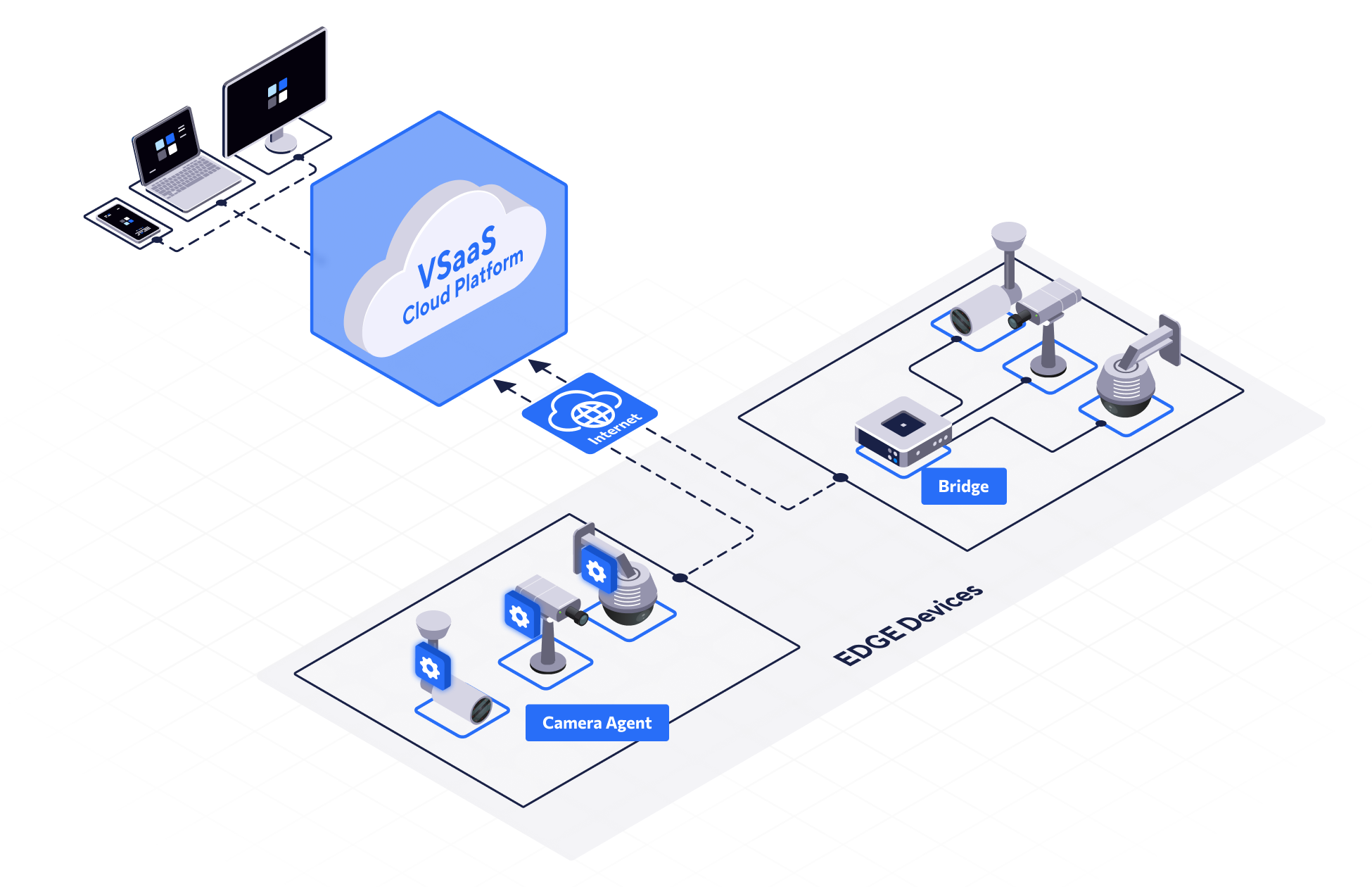
The VSaaS video surveillance platform supports a wide range of deployment scenarios and equipment connection methods — from integrating individual cameras at small sites to building complex hierarchical structures across distributed networks. The system easily adapts to specific requirements and site network infrastructure due to its high flexibility and scalability. The system architecture supports both direct camera integration and integration through Edge devices that act as an intermediate layer for connecting cameras.
An Edge device is a specialized hardware and software device or embedded service deployed within the user’s local infrastructure. Equipped with specialized firmware, the device acts as a gateway between the user’s IP cameras and the video surveillance platform. It collects video streams from cameras in the local network, performs initial processing, optimizes traffic based on the available bandwidth, and transfers data to the video platform for further processing and storage.
Flexible Edge device connection and management. Edge devices allow end users to connect new equipment to the platform independently through the web interface. At the same time, the system provides flexible access management: users can involve administrators when needed to activate Cameras (Agent) or Bridge devices.
Data privacy is ensured through strict permission separation. By default, platform administrators only see the technical parameters required for configuration, while video streams remain private and are available only to the end user.
The video surveillance system supports the following types of Edge devices:
-
Bridge hardware and software solution
-
Camera (Agent) – IP camera with the integrated Agent service
The Bridge hardware and software solution is a specialized firmware-equipped device that aggregates video streams from local cameras and establishes a connection between cameras and the cloud video surveillance platform. Cameras connect directly to the Bridge device, which then transmits data to the video surveillance system via an internet connection. The Bridge hardware system serves as an optimal solution for distributed sites and complex network environments that require maximum local-level video surveillance autonomy, such as isolated and secure zones with limited internet access or remote, closed, and temporary facilities. Detailed information about the Bridge device and its operation is available in the Bridge documentation section.
The Camera (Agent) is an IP camera with a specialized Agent edge service integrated into the camera firmware by the device manufacturer. The Camera (Agent) functions as an independent edge device. The built-in Agent service enables the camera to transmit video, audio, and metadata directly to the video surveillance platform without additional intermediary devices. It is suitable for sites or connection scenarios with a small number of cameras. Detailed information is available in the corresponding Camera (Agent) documentation section.
Flexible Edge device connection and management
The platform supports various scenarios for administrators and end users to work with Bridge and Camera (Agent) Edge devices. At the same time, the administrator has full control over the entire lifecycle of Edge devices on the platform: from connecting and configuring devices to determining how they are used and assigning their affiliation.
The Device registration control tool allows administrators to determine which devices can be added to the platform and how they can be used afterward. Administrators specify which devices are allowed in advance. This reduces the risk of unauthorized equipment connecting to the platform, improves infrastructure security, and simplifies system scaling.
The Administrator cabinet provides a Device registration control tab for each equipment type. Here, administrators create an allowlist of devices by adding their MAC addresses individually for granular control or through bulk import to deploy large batches of equipment quickly. Once the list is configured, other administrators and users can also activate listed devices on the platform independently, depending on the assigned affiliation. This combines centralized control with flexible device activation without requiring separate approval for every connection.
The device affiliation assignment mechanism allows administrators to determine how each device connected to the platform is used: which Edge cameras to add to the Platform tree for centralized video surveillance (General affiliation), which to assign to a user for personal management and viewing (Custom affiliation), and which to leave without an assignment until a decision is made about their use (Unassigned).
Optimized Live stream transmission from Edge device cameras
The platform optimizes Live stream transmission for Bridge and Camera (Agent) Edge devices to reduce outgoing internet bandwidth usage and improve video playback stability.
-
Live streams use SD quality. By default, the system transmits Live streams in SD quality. This significantly reduces outgoing internet bandwidth usage and the amount of transmitted data, ensuring smooth, stable video even over slow connections. When needed, users can switch to HD quality in the camera player in the web interface or mobile app. Live stream optimization doesn't affect archive recording quality: the system stores video and makes it available in its original maximum HD quality.
-
Smart Live stream pause. If no one is viewing the camera and background archive recording isn't active, the system pauses video data transmission to reduce network load. The RTSP connection remains active, so video transmission resumes immediately when viewing starts again, without reconnecting to the camera.