
On the page:
-
Bridge device overview
-
Bridge functionality and capabilities
-
Benefits of using Bridge
-
Bridge use cases
Bridge device: general information
Bridge is one of the methods for connecting video cameras to the cloud video surveillance service. The video surveillance provider determines whether the Bridge device is required based on the system architecture and deployment scenario.
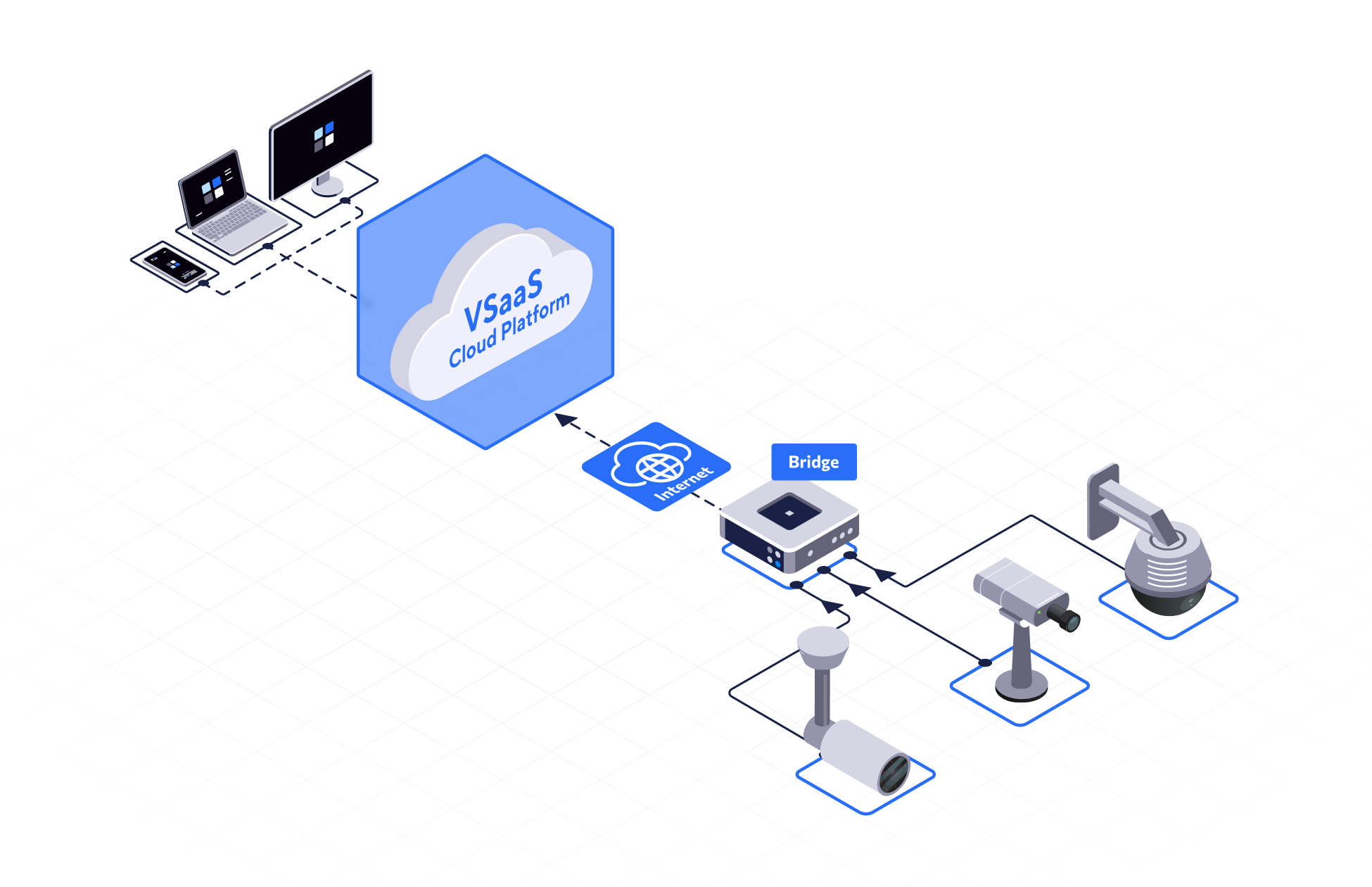
The Bridge solution is a specialized firmware-equipped device that aggregates video streams from local cameras and establishes a connection between cameras and the cloud video surveillance platform. Cameras connect directly to the Bridge device, which then transmits data to the video surveillance system via an internet connection. The Bridge hardware system serves as an optimal solution for distributed sites and complex network environments that require maximum local-level video surveillance autonomy, such as isolated and secure zones with limited internet access or remote, closed, and temporary facilities.
Bridge provides a secure and stable connection between cameras in the user's local network and the cloud service by using the existing network infrastructure, including the internet. This allows the local video surveillance system to integrate with the cloud platform without changes to the network architecture or complex additional configuration.
The Bridge device receives video and audio streams from cameras over the standard RTSP or ONVIF protocols, enabling integration with equipment from different manufacturers. It then transfers the data to the platform for further processing and long-term storage. Users can access processed data in real time and as archived recordings through the web, desktop, or mobile application.
Bridge functionality and capabilities
Camera connectivity and management
-
Camera integration: Bridge provides fast and secure integration of individual cameras or groups of local cameras connected to the same local network as the Bridge device.
-
Data transfer: Bridge receives video and audio streams from connected cameras and transfers them to the VSaaS cloud through the existing network infrastructure.
-
Remote management: administrators manage connected cameras and configure recording and archive retention through the cloud video surveillance platform.
-
Built-in analytics events: Bridge receives analytics events generated by cameras, such as motion detection, and transfers them to the cloud for processing and alert generation.
Flexible video storage
Bridge supports a hybrid video storage model that adapts to network availability and reliability requirements.
-
Cloud storage: video recordings are stored in the VSaaS cloud.
-
Local storage: when the internet connection is unavailable, Bridge temporarily records video to a removable SD card. After network connectivity is restored, Bridge automatically synchronizes the locally stored recordings with the VSaaS cloud. This ensures continuous recording, preserves data integrity, and prevents video loss during temporary network outages. Recommended memory cards for the Bridge device: MicroSDXC (64, 128, 256, 512 GB), UHS-I, Class 10, U3, V30, High Endurance.
For details about storage settings for cameras connected through the Bridge device, see the Archive storage documentation section.
Data transfer optimization and security
-
Data encryption: encrypts video streams and metadata to protect information transmitted between Bridge and the cloud.
-
Traffic optimization: the system minimizes network load by transmitting media data only when recording video to the platform cloud or when a user is viewing live video from a camera. For cameras connected to Bridge edge devices, Live stream transmission is optimized to reduce outbound internet bandwidth usage and improve video playback stability.
-
-
Live stream transmission in SD quality. By default, Live streams are transmitted in SD quality. This significantly reduces outbound internet bandwidth usage and the amount of data transferred, ensuring smooth, stable video playback even over slow connections. Users can switch to HD quality in the camera player through the web interface or mobile app when needed. Live stream optimization doesn't affect archive recording quality: video is recorded and remains available in its original maximum HD quality.
-
Smart Live stream pause. If no one is viewing the camera and no background archive recording is in progress, video data transmission is paused to reduce network load. The RTSP connection remains open, so video transmission resumes immediately when viewing starts again, without reconnecting to the camera.
-
Bridge benefits
-
Scalability: supports deployments of any size, from residential installations to large enterprise environments.
-
Simple deployment: does not require additional software or complex configuration.
-
Broad camera compatibility: integrates with existing cameras, extends their capabilities without replacing hardware, and supports multiple camera models and standard protocols.
-
Secure communication: encrypts data and helps protect the system from unauthorized access.
-
Remote updates and management: supports remote software updates and device management.
Bridge use cases
Bridge for homes, offices, and various sites
Bridge provides a universal approach for video surveillance deployment. Its architecture allows the device to operate effectively in residential environments, offices, transportation facilities, remote locations, closed areas, and temporary sites, including environments with unstable internet connectivity.
Bridge provides reliable, flexible, and autonomous video surveillance even in complex network environments and at sites with increased security requirements or local data storage needs.
Video surveillance at sites with unstable internet connectivity
Bridge provides reliable video surveillance at sites with slow, unstable, or intermittent internet connections through autonomous operation. The device continuously records video and audio data even when the connection is unavailable. Local storage acts as a buffer and automatically synchronizes recordings with the cloud after connectivity is restored, ensuring that critical data remains available.
Video surveillance in isolated and protected areas with limited external access
Bridge enables video surveillance deployment at restricted, critical, or industrial sites with strict limitations on access to external networks, including the internet.
Video surveillance for mobile and temporary sites
Bridge provides autonomous video surveillance for mobile and temporary sites, such as construction sites, mobile units, and temporary security posts, where fast deployment and independence from permanent internet connectivity are essential.
The device operates effectively with limited or unavailable network infrastructure, ensuring stable recording and preserving camera data during connection interruptions.
Continuous video surveillance in distributed networks
Bridge is ideal for organizations with distributed facilities, such as branch offices, warehouses, and remote sites, where centralized management and local resilience are required.
The device provides secure local data storage at each site, automatically synchronizes recordings with the cloud after network recovery, and integrates with multiple cameras through simple configuration and cloud service compatibility.
Bridge in transportation environments
Bridge provides autonomous and continuous video surveillance for transportation environments, including locations with unstable or unavailable internet connectivity.
The device records video and audio data locally, automatically synchronizes recordings with the cloud after connectivity is restored, supports live monitoring for operational control, and enables local video viewing by drivers without cloud access. Bridge does not require permanent network infrastructure, making it suitable for transportation environments with variable connectivity.
Bridge management overview
Bridge management supports the following scenarios:
-
Management by technical specialists and administrators: detailed information is available in the Administrator guide for the Bridge documentation section.
-
Management by video surveillance users: users can add a Bridge device to the video surveillance platform independently and integrate their cameras with the platform. Detailed instructions are available in the User guide for the Bridge documentation section.