
Administrators can configure cloud archive recording if they have the following permissions in the Devices group:
-
Bridge. General
-
Bridge. Configure HD archive recording
-
Bridge. Configure SD archive recording
Administrators can grant users permission to enable cloud archive recording through Devices > Bridge. Archive.
The Archive tab provides information about available cloud and local storage for Bridge recordings.
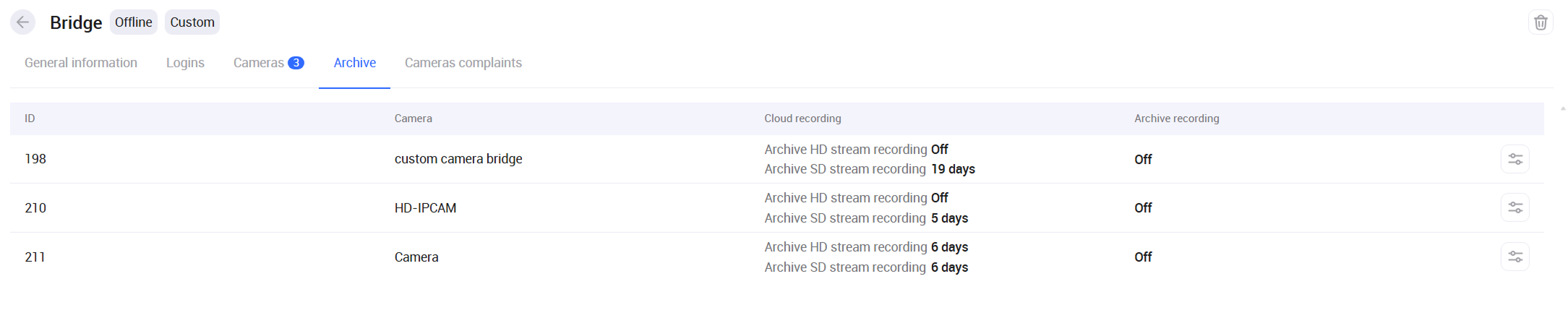
The table lists cameras and their current local and cloud archive recording settings:
-
ID – the camera's ID in the system.
-
Camera – the camera's name in the system.
-
Cloud recording – cloud archive recording settings:
-
When cloud recording is enabled, the retention period in days is displayed for each stream. Select the archive recording settings button to choose streams and specify the retention period.
-
Disabled – cloud recording is disabled.
-
-
Local recording – local archive recording settings (planned in future releases):
-
When local recording is enabled, the archive retention period (at least one day) and the selected local storage name are displayed.
-
Disabled – recording to local storage is disabled.
-
-
The button for configuring cloud archive recording. Select the recording settings button to configure cloud archive recording.
The form provides the following settings:
-
Enable or disable cloud archive recording. Enabling it makes additional archive recording settings available.
-
The number of days to retain recordings for the selected streams.
-
HD – record only the high-quality stream.
-
SD – record only the low-quality stream.
-
HD and SD – record all streams.