
The General information tab displays general information about the Bridge device, organized into sections.
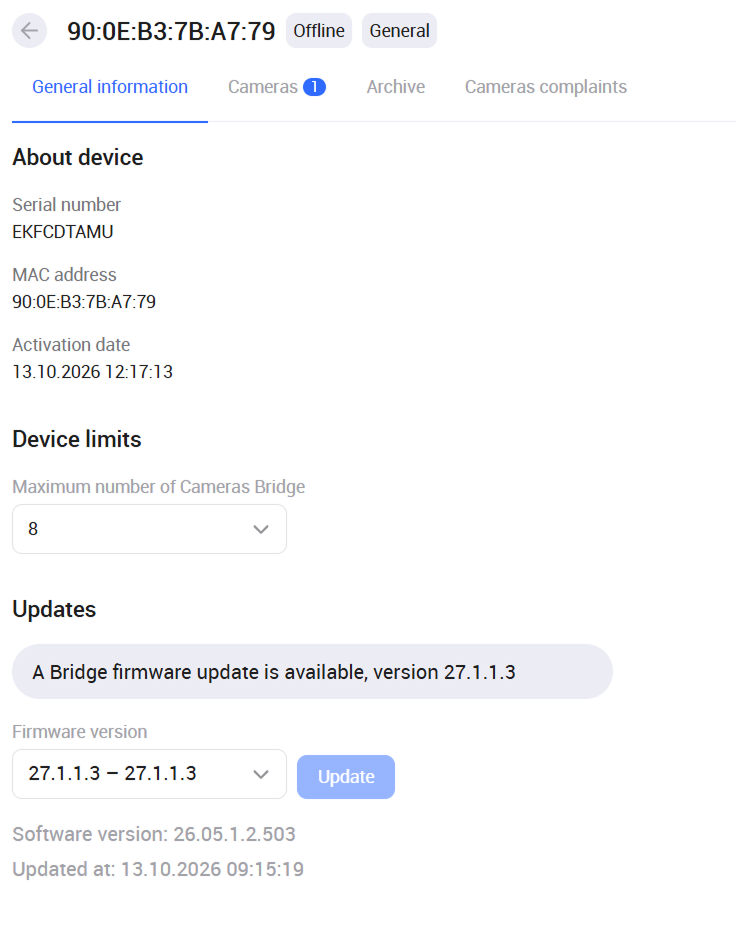
About the device
This section displays:
-
The Bridge serial number.
-
The Bridge MAC address.
-
The date the Bridge was activated in the system.
Device limits
The administrator can set the maximum number of cameras that can connect to the Bridge simultaneously.
Select a limit from the dropdown list. If more cameras are already connected than the selected limit allows, the system prevents the change from being saved and displays a notification.
Changes are applied automatically.
Updates
This section displays firmware information:
-
The current Bridge firmware version.
-
The date of the latest firmware update.
When the General information tab opens or refreshes, the system checks for available Bridge firmware updates. If an update is available, a message displays its version number.
Firmware can be updated only when the Bridge device has the Online status.
If multiple firmware versions are available for the device, select a version from the dropdown list. The current firmware version isn't listed.
Select the appropriate firmware version, select Update, and confirm the update.
An information bar displays the update progress.
If an error occurs during the update, the process stops, the Bridge reverts to its previous firmware version, and a notification is displayed.
A confirmation message is displayed when the Bridge firmware update succeeds.
Once the process finishes, reloading the page updates the Current version and Update date fields.
If firmware is published for a Bridge device with the Custom affiliation type, the assigned user can start the update through their web interface.