
Bridge information is presented in a table with the following columns:
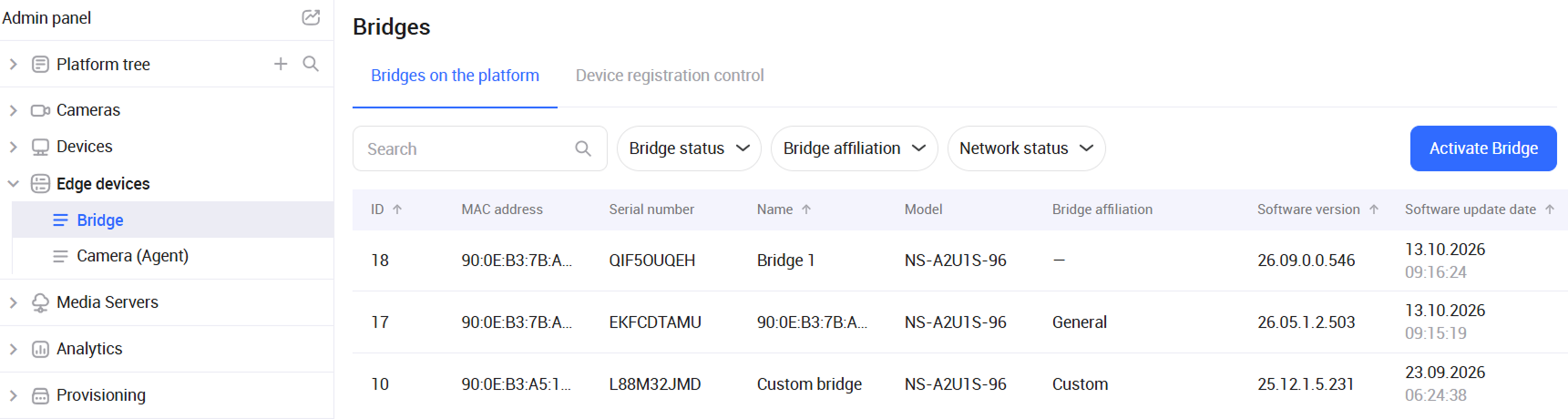
Bridges on platform:
-
ID – the Bridge device's ID in the system.
-
MAC address – the Bridge device's MAC address.
-
Serial number – the Bridge device's serial number.
-
Name – the Bridge device's name.
-
Model – Bridge model.
-
Bridge affiliation – the Bridge assignment type:
-
General – at least one Bridge camera is added to a location in the platform tree.
-
Custom – a user is assigned to the Bridge device.
-
Unassigned – no assignment type is selected.
-
-
Firmware version – the current Bridge firmware version.
-
Firmware update date – the date of the latest firmware update.
-
Bridge status – the device's status on the platform. Available statuses are:
-
Activated – an administrator or user activated the Bridge device successfully.
-
Activation in progress – the Bridge device is being activated.
-
Reserved – a user added the Bridge device to the Portal but hasn't paid for it.
-
Deactivation in progress – the Bridge device is being deactivated.
-
-
Bridge network status – the device's network status: Online or Offline.
-
Activation date – the date the Bridge device was activated in the system.
Select a Bridge device's row to open its device detail card.
Search
Use the Search field to find a device by serial number or MAC address. Enter at least three characters.
Sorting
Select a column heading to sort devices by:
-
ID
-
Name
-
Firmware version
-
Firmware update date
Filtering
The device list can be filtered by:
-
Bridge status on the platform
-
Affiliation type
-
Bridge network status