
Capabilities of the Intercom list section include:
-
View the list of added and deleted intercoms.
-
Search and filter.
-
Access the intercom card to view and edit settings.
To view intercoms within the tree hierarchy, use the Intercom tree view section, where intercoms are distributed into branches.
Intercoms are grouped on the following tabs in the Intercom list section: Added and Deleted.
The Deleted tab lists the deleted intercoms. Here, you can select the deleted intercom to view its settings details. Deleted intercoms are kept in the list up to 30 days from deletion.
The Added tab lists the added intercoms.
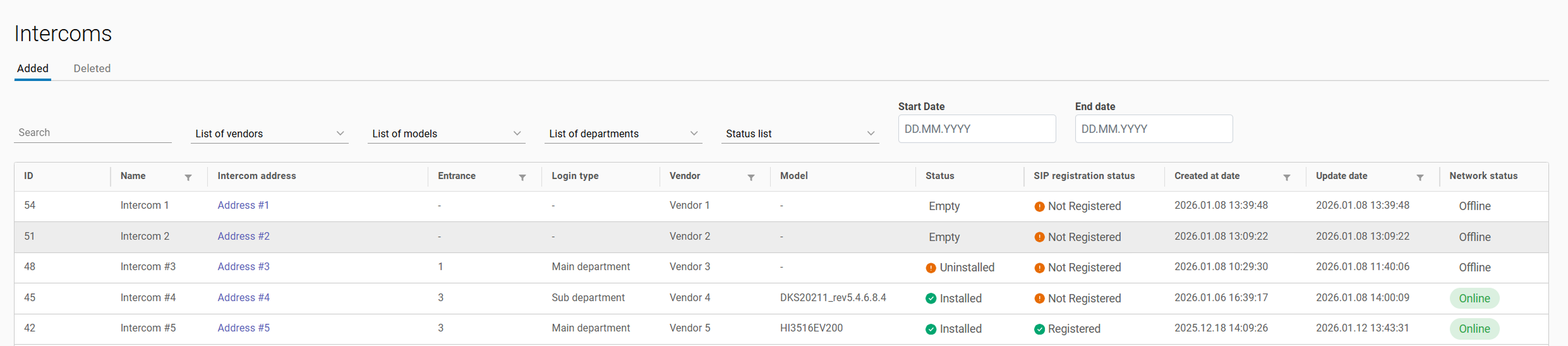
The table allows for sorting of intercoms:
-
By name
-
By entrance type
-
By creation date
-
By update date
Search for intercoms:
-
By name
-
By address
-
By UUID
Intercom filtering options:
-
By entrance type (primary, additional, or any)
-
By vendors
-
By model
-
By status
-
By intercom creation date range
To view and edit the intercom settings, select a relevant row. This will redirect you to the intercom card.