
Cloud Video Analytics: cutting-edge AI-driven video analytics in the cloud
Cloud Video Analytics is a comprehensive solution based on computer vision technologies, artificial intelligence (AI), and neural network algorithms. This solution is designed for automated video stream analysis, fixing (detecting and recording) pre-programmed events, and accurate data delivery. It is used as an integral component for solutions within the VSaaS cloud video surveillance platform. This approach ensures maximum flexibility and adaptability for various tasks and application scenarios.
Analytics is an advanced module within the Cloud Video Analytics solution, powered by neural network technologies and designed for high-performance analysis and intelligent processing of video streams.
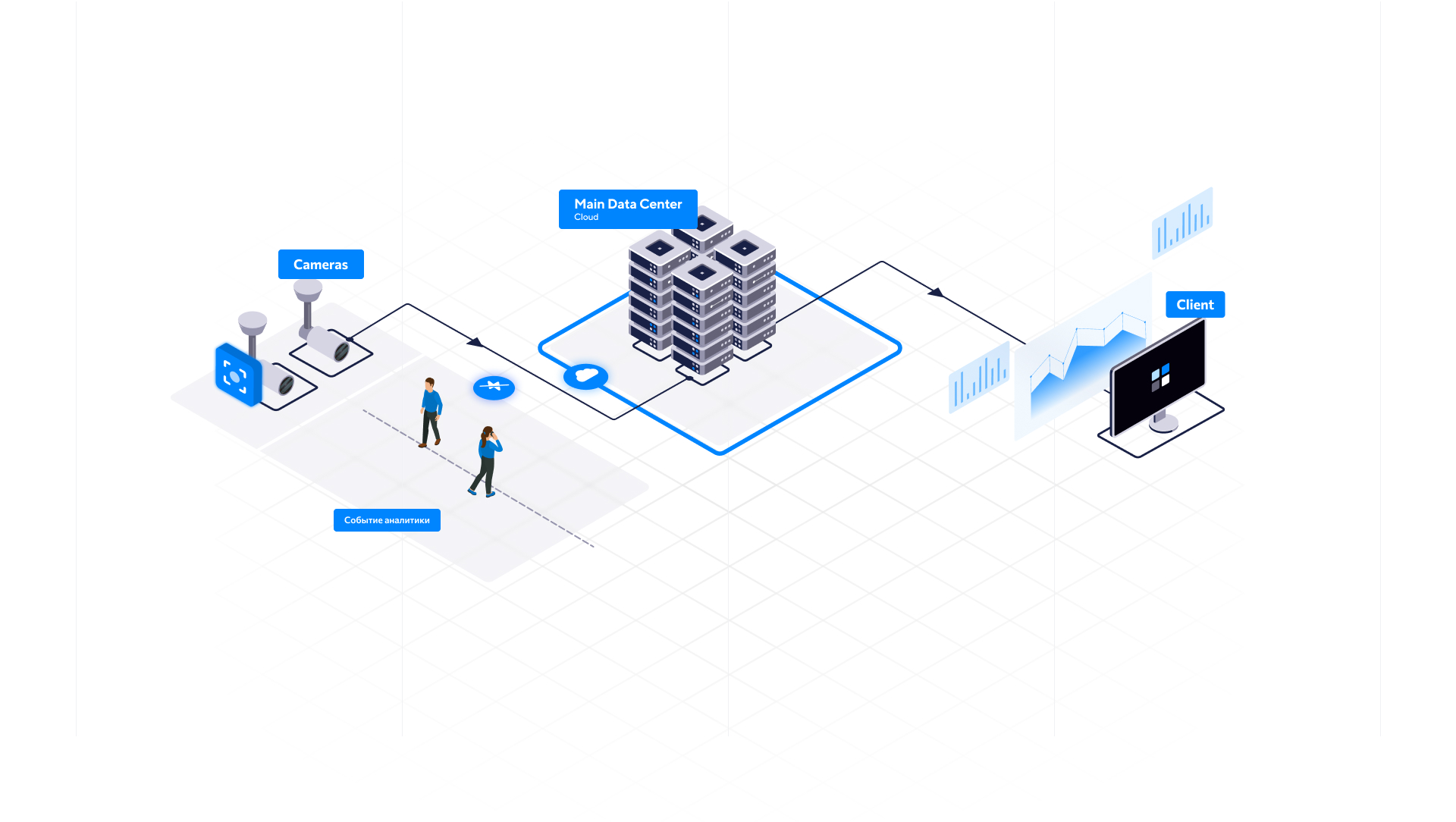
The Analytics documentation provides comprehensive coverage of the Cloud Video Analytics solution, addressing its configuration, usage, as well as the architecture and functionality of the Analytics module.
In this article:
-
Key functions and capabilities of Cloud Video Analytics
-
Advantages of the Analytics module
-
Video Analytics: setup, management, and usage
-
Analytics module: architecture and functionality
Key functions and capabilities of Cloud Video Analytics
-
Detection and intelligent reaction. Pre-programmed events are captured in real-time with an immediate, intelligent system response to that event. For example, upon smoke or fire detection in the video frame, a message about this event will be sent to Telegram or the camera view will automatically open in the video surveillance web application.
-
Various levels of Analytics are supported, ranging from basic event detection to recognition and identification. This comprehensive approach enables the implementation of advanced scenarios for monitoring, enhancing security, automating processes, and optimizing facility management. For detailed information on the specific types and capabilities of analytics offered, please refer to the dedicated documentation section: Types of Analytics.
Level 1 is focused on the basic detection: smoke, fire, loud sounds, camera damage, line crossing, and motion detection in designated area.
Level 2 offers advanced people-traffic counting, including demographic data (gender and age determination) and object visualization within the frame. It also provides dynamic visitor reporting (hourly, daily, and weekly) for detailed attendance analysis.
Level 3 is focused on the recognition and identification of objects: human faces with verification against a reference database, vehicle license plates, and freight containers.
-
Video to data conversion. The system processes the input video stream from surveillance cameras, transforming the visual information into a set of structured data points essential for subsequent in-depth analysis. The video analytics system detects key events, classifies objects, and generates analytical information in a convenient format. All results are conveniently presented to the user via a web-based interface, which features a comprehensive dashboard that visualizes metrics across various types of analytics, including events, statistics, and process dynamics, ensuring quick access to key data.
-
Support for multiple operating modes. The system can operate with live video streams from cameras in real time, as well as with recorded video archives.
Advantages of the Analytics module
The module is engineered to deliver high performance while ensuring maximum user convenience.
-
Flexible and adaptable architecture: allows quick deployment of new business scenarios through its scalable and adaptable design.
-
AI-powered data processing: an intelligent data pipeline based on artificial intelligence.
-
Resource optimization: CPU-based data processing significantly reduces hardware costs, which typically account for a large portion of video analytics expenses.
-
Scalable architecture: engineered to maintain performance with many simultaneous users.
-
User-centric approach (B2B/B2C/B2G): designed with an intuitive interface to ensure accessibility for all users, including non-professionals.
-
Complete integration: full compatibility with other VSaaS solutions delivers a unified operational experience. One of the integrations with the video surveillance system is the Intercom module, which also makes use of Video Analytics – specifically Face recognition – to automatically open doors for authorized users.
-
Personalized client systems: every organization or individual client is provided with a separate virtual system and web interface, enabling tailored workflows.
-
Flexible licensing: a transparent policy for services with numerous users.
Video Analytics: setup, management, and usage
For video analytics to work effectively, both the system capabilities and proper camera installation and setup are essential. Camera feeds must deliver clear, high-resolution visuals without distortion, while system parameters should be configured to match specific operational goals. Adopting this integrated approach significantly enhances the reliability of the system, reduces false detections, and ensures that Analytics deliver accurate and actionable results.
Optimal camera positioning for accurate Video Analytics
A correctly selected and properly installed video camera is essential for acquiring high-quality data, which underpins the reliable and efficient performance of a video analytics system. Parameters such as the camera’s tilt angle, mounting height, focal length, and scene illumination directly influence the quality of the video stream received from the camera, and consequently, the accuracy of video analytics algorithms. For detailed guidelines on camera positioning, refer to the Camera specifications and placement guidelines by Analytics type the documentation.
Setup and usage of Video Analytics
Engineered in alignment with the high-usability paradigm, our platform demonstrates interaction scalability, providing an equivalent level of operational efficiency for both the professional operators and non-specialized users.
For administrators. System administrators manage the global Analytics configuration from the dedicated Video Surveillance Admin interface. The administrator is provisioned with tools for comprehensive Video Analytics management, including the configuration of processing parameters, monitoring of computational resources, event analysis, optimization of service deployment, configuration of Analytics for smart intercoms to enable door access via face recognition, and assignment of appropriate user permissions for access to Analytics functionality. Detailed administration procedures for Analytics are provided in the Administrator guide. Analytics documentation section.
For users. Unified Analytics and cross-platform data insight. Video surveillance system delivers consistent, powerful analytics and data viewing capabilities across all interfaces: web, desktop, and mobile. Users are empowered to define custom monitoring scenarios (analytics cases), automate system responses to detected events, and review real-time video streams alongside archived video evidence. Functionality is optimally tailored to each platform, ensuring a fluid and effective user experience regardless of the device. For details on how users manage and use Analytics, navigate to the documentation section User guide. Analytics.
Analytics module: architecture and functionality
The architecture and operational principles of the Analytics module are detailed in the Analytics module: architecture and functionality documentation section.