
PTZ (Pan-Tilt-Zoom) cameras offer remote control capabilities, allowing users to pan, tilt, and zoom the camera view. By moving the camera left, right, up, or down, and adjusting the zoom level, the user can focus on specific areas of interest. If a camera is equipped with this functionality, the user will be able to utilize this tool in Live mode if they have the PTZ control permission enabled.
The Manage PTZ option is available to users in Live mode only.
The PTZ control interface in the mobile app supports continuous camera movement. Users can smoothly change the camera direction by keeping the directional control pressed.
To access the PTZ control panel of a camera:
-
Select the More icon in Live mode of the player.
-
On the opened tab, select Manage PTZ.
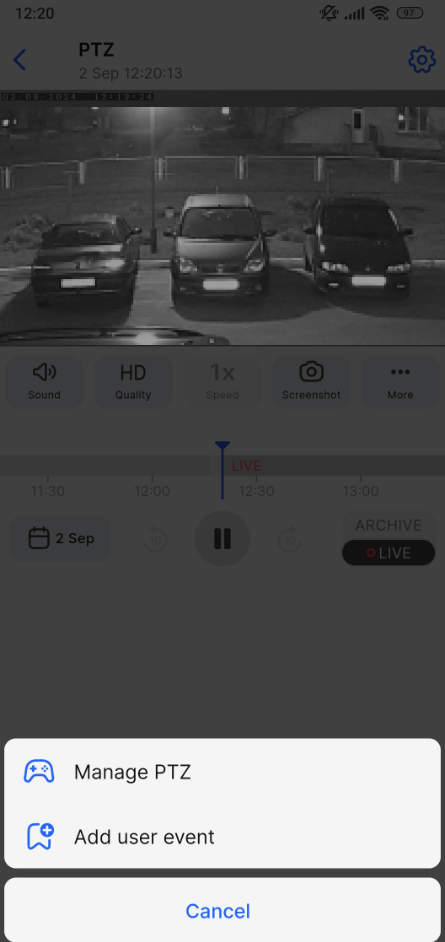
-
Selecting this action opens the Manage PTZ control panel with these controls:
-
Directional arrows: Pan the camera left, right, up, or down.
-
Zoom: Zoom in or out.
-
Speed control: Use the slider to adjust movement speed.
-
Reload icon: Restore default settings.
-
[X] icon: Close the panel.
.png?cb=086c418e5eaeb9d6c1784397e4df91ed)