
The ONVIF services tab is displayed only for cameras connected through ONVIF.
The tab displays ONVIF services available for configuration:
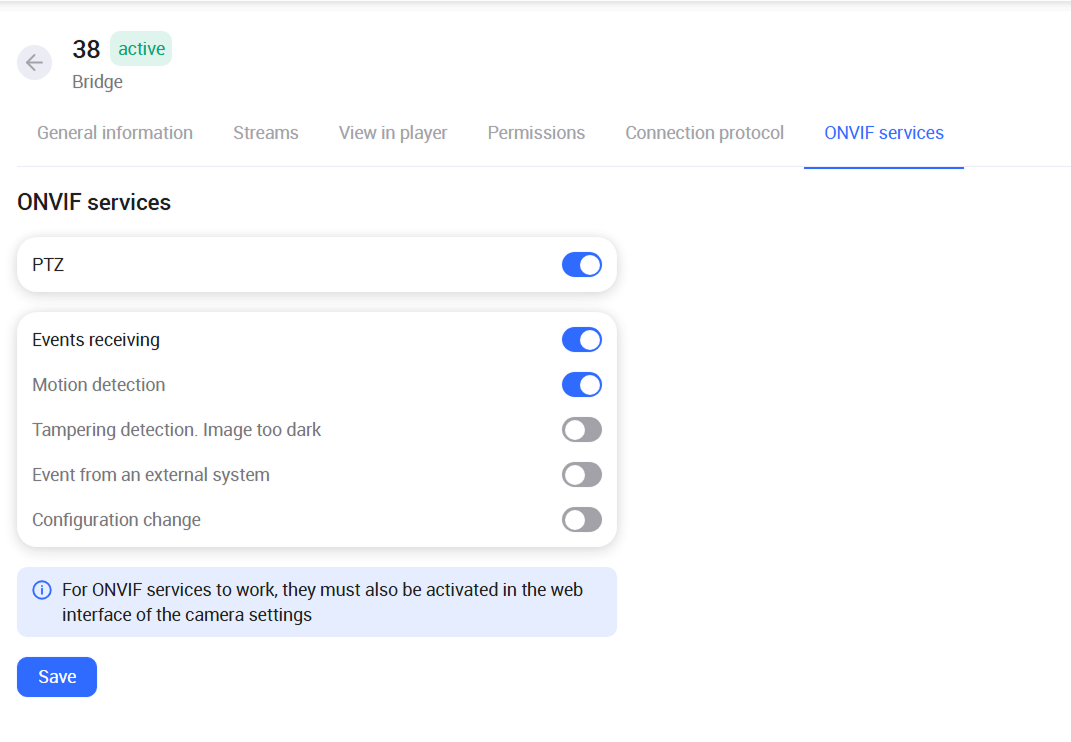
Administrators can configure ONVIF event reception only for Bridge cameras with the General or Unassigned affiliation type. For cameras with the Custom assignment type, the list is read-only.
PTZ control – enables or disables PTZ camera control in the player. Disabled by default.
Receive events – enables or disables subscribing to camera events through ONVIF. Disabled by default.
When enabling Receive events, select which ONVIF events to receive.
The corresponding options must also be enabled on the camera itself, outside the VMS platform.
Select Save to apply changes.
As a result:
-
Events received through the configured ONVIF subscription are displayed:
-
In the Administrator interface under Logging > Events > Camera events.
-
In user interfaces under Events > Camera events.
-
-
PTZ control becomes available in the camera player in both administrator and user interfaces.
Configure event reception as a user
Users can configure ONVIF event reception only when both conditions are met:
-
A user is assigned to the Bridge.
-
The corresponding options are enabled on the camera itself, outside the VMS platform.
Users configure the service under Devices > Bridge > device detail card > camera detail card > ONVIF services tab.
Events received through ONVIF are displayed under Events > Camera events in the web, desktop, and mobile user interfaces.