
This documentation applies to proprietary Camera (Agent) devices of the following models:
-
Mini dome camera CAX-DT01BM-2PS-28
-
Mini bullet camera CAX-BT01BM-2PS-28
Configure a static IP address on a Camera (Agent)
Follow these steps:
-
Download the latest version of Neutral Device Manager and start the application on the PC. For more information, see the Tools documentation section.
-
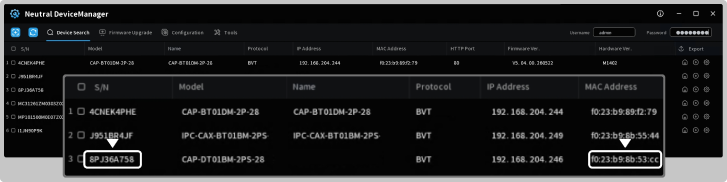
Search for cameras: the application scans the network and displays a list of all discovered cameras.
-
Identify the camera: find the required camera in the list by its MAC address or serial number. The MAC address and serial number are available on the camera label or packaging.
-
On the opened panel, change the IP assignment mode from DHCP to Use the following IP address.
.png?cb=f20cdd3b9ac7cff29397ada81eea84f8)
-
Enter the network settings as follows:
-
Start IP: specify the static IP address.
-
Subnet mask: specify the default gateway.
-
Default gateway: specify the subnet mask.
-
Note: The field entry order described above is correct for this device and does not indicate a software error. Follow the instructions exactly as provided.
-
Enter the Username (by default: admin) and Password (by default: & and the serial number of the camera). For example, &8PJ36A758.
.png?cb=84645a773205b307e7e84ed25c91c9c1)
-
Select Modify to save the new data. A notification appears when the camera IP address changes successfully.