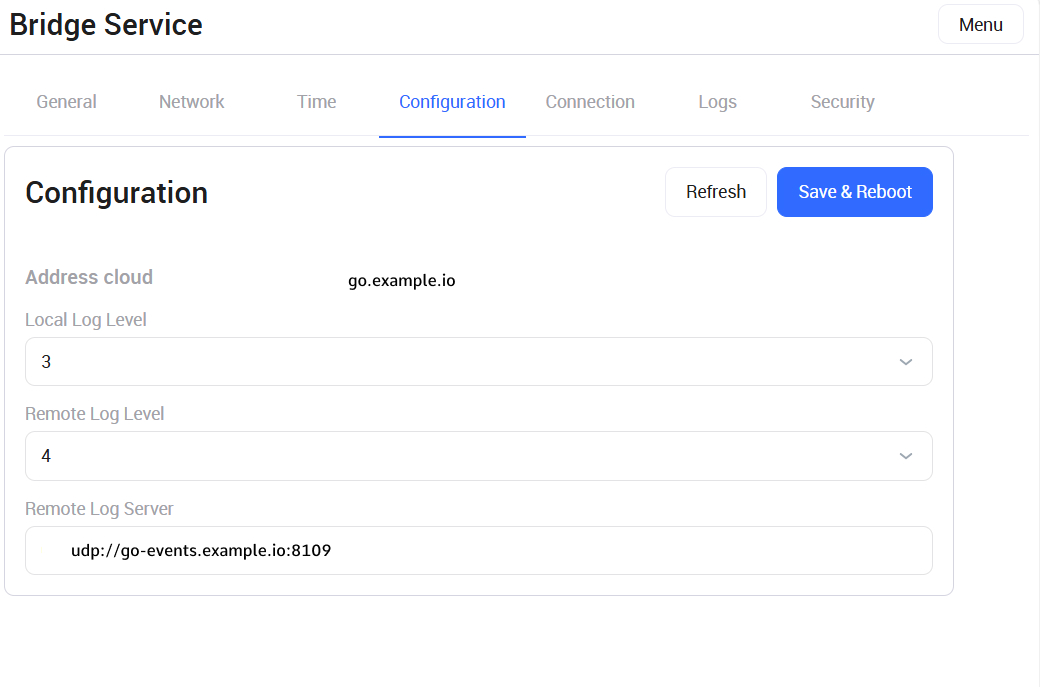
The Configuration section allows users to configure system log transmission settings, manage log detail levels, and view the video surveillance cloud address.
Parameter and control descriptions
-
Cloud address – displays the network address of the video surveillance platform. This field is read-only and cannot be modified by the user.
-
Local log level – allows users to select the log detail level stored locally on the device.
-
Remote log level – allows users to select the log detail level sent to the remote server.
Do not change the log level unless required by the administrator or technical support. Higher log detail levels can increase system load.
-
Remote log server – specifies the address of the log server where the device sends system events. By default, the field contains the following value: udp://go-events.example.io:8109.
Actions and control buttons
-
Refresh – updates the current data and logging settings on the page by loading the latest saved parameters.
-
Save and Reboot – saves the changes and restarts the Bridge device.
Restarting the service temporarily interrupts video stream transmission to the video surveillance platform. During the Bridge device restart, cameras associated with the device are unavailable.